
Zero Trust with Microsoft 365: How to Build a More Secure Modern Workplace
 Ben Opit
Business Transformation Lead - MS Biz App and AI • Sep 7, 2026 • 7 min read
Cybersecurity is no longer about protecting a network perimeter.
Employees work from home, access cloud applications from multiple devices, collaborate with external partners, and share information across Microsoft 365 every day. As a result, the traditional approach of trusting users and devices simply because they are inside the corporate network is no longer enough.
This is where Zero Trust comes in.
Zero Trust is a security approach based on a simple principle: never trust, always verify. Every user, device, application, and access request should be validated before access is granted.
At Exigo Tech, we help organisations strengthen their Microsoft environments as their Managed Intelligence Partner, using practical Zero Trust strategies that align security with business operations.

How to Secure Microsoft Copilot Agents with Microsoft 365 E5
What Is Zero Trust?
Zero Trust does not mean trusting nothing or blocking everyone.
Instead, it means organisations should avoid automatically trusting users, devices, or applications.
Every access request should be evaluated based on factors such as:
- Who is requesting access?
- What device are they using?
- Where are they connecting from?
- What application are they accessing?
- What information are they trying to access?
- Is the activity considered risky?
Why Zero Trust Matters for Microsoft 365
Microsoft 365 has become the centre of daily business operations for many organisations.
Employees use:
- Outlook
- Microsoft Teams
- SharePoint
- OneDrive
- Word
- Excel
- PowerPoint
These applications contain valuable business information.
A compromised Microsoft 365 identity can potentially give attackers access to emails, documents, conversations, customer information, and other sensitive data.
The Three Core Principles of Zero Trust
Microsoft’s Zero Trust approach is built around three core principles.
Verify Explicitly
Every access request should be authenticated and authorised using available information.
This may include:
- User identity
- Location
- Device status
- Application
- Data sensitivity
- Sign-in risk
Instead of assuming access is safe, organisations continuously evaluate whether the request should be trusted.
Use Least-Privilege Access
Users should only receive the access required to perform their job.
This reduces the potential impact of:
- Compromised accounts
- Insider threats
- Credential theft
- Accidental data exposure
Least privilege also means regularly reviewing permissions and removing access that is no longer required.
Assume Breach
Zero Trust assumes that a security incident could already be occurring.
Instead of relying solely on prevention, organisations prepare to detect, contain, and respond to threats.
This involves:
- Monitoring suspicious activity
- Segmenting access
- Limiting lateral movement
- Protecting sensitive data
- Responding quickly to incidents
Assuming breach helps organisations reduce the potential impact of a successful attack.
Building Zero Trust with Microsoft 365
Microsoft 365 provides several capabilities that can support a Zero Trust security strategy.
1. Start with Identity Security
Identity is at the centre of modern cybersecurity.
Attackers increasingly target user accounts because a compromised identity can provide access to multiple applications and systems.
Microsoft Entra ID helps organisations manage identities and control access across Microsoft 365.
Key capabilities include:
- Multi-Factor Authentication (MFA)
- Conditional Access
- Single Sign-On (SSO)
- Identity Protection
- Privileged Identity Management (PIM)
Strong identity controls are the foundation of a Zero Trust environment.
2. Implement Multi-Factor Authentication
Passwords alone are no longer enough.
Phishing, credential theft, password reuse, and other attacks can compromise user credentials.
Multi-Factor Authentication adds another layer of verification before access is granted.
However, organisations should also consider how MFA is implemented.
Modern identity attacks can involve:
- MFA fatigue
- Adversary-in-the-middle attacks
- Token theft
- Session hijacking
For this reason, organisations should combine MFA with broader identity protection and Conditional Access policies.
3. Use Conditional Access to Control Access
Conditional Access allows organisations to define rules around how users access Microsoft 365 resources.
Policies can consider factors such as:
- User identity
- Device compliance
- Location
- Application
- Sign-in risk
For example, an organisation may require additional authentication when:
- A user signs in from an unfamiliar location
- A device does not meet security requirements
- The sign-in is considered high risk
Conditional Access helps organisations move beyond one-size-fits-all security controls.
4. Secure Devices Accessing Microsoft 365
Users access Microsoft 365 from laptops, mobile phones, tablets, and other devices.
A compromised or unmanaged device can create a significant security risk.
Microsoft Intune can help organisations manage and secure devices by enforcing policies such as:
- Device encryption
- Password requirements
- Operating system updates
- Application controls
- Device compliance
Conditional Access can then be used to restrict access from devices that do not meet security requirements.
This helps ensure that access decisions consider both the user and the device.
5. Protect Your Data
Zero Trust should not stop at authentication.
Organisations also need to protect the information users access.
Microsoft Purview can support data governance and protection through capabilities such as:
- Sensitivity labels
- Data classification
- Data Loss Prevention (DLP)
- Information protection
- Insider risk management
These controls help organisations understand where sensitive information exists and reduce the risk of inappropriate sharing.

Agentic AI for Operations Leaders: Turning AI into Action
6. Apply Least Privilege to Microsoft 365
Over-permissioned access is a common security problem.
Employees may retain access to:
- Old SharePoint sites
- Sensitive Teams channels
- Shared mailboxes
- Business applications
- Administrative functions
Over time, these permissions can create unnecessary risk.
Organisations should regularly review:
- User access
- Administrative privileges
- Application permissions
- Guest accounts
- External sharing
The goal is to ensure people have access to what they need—and nothing more.
7. Protect Against Email-Based Threats
Email remains one of the most common entry points for cyberattacks.
Phishing emails can lead to:
- Credential theft
- Malware
- Business email compromise
- Ransomware
Microsoft Defender for Office 365 can provide additional protection against email-based threats.
Capabilities can include protection against:
- Phishing
- Malicious links
- Dangerous attachments
However, email security should work alongside identity controls and employee awareness training.
8. Monitor and Respond to Threats
Zero Trust is not a one-time implementation.
Organisations need continuous visibility into their environment.
Security teams should monitor for:
- Suspicious sign-ins
- Unusual user behaviour
- Compromised devices
- Privilege changes
- Data access anomalies
Microsoft Defender and other security tools can help organisations detect and investigate threats.
For businesses without a dedicated internal security team, managed security services can provide additional monitoring and response capabilities.
Common Zero Trust Mistakes to Avoid
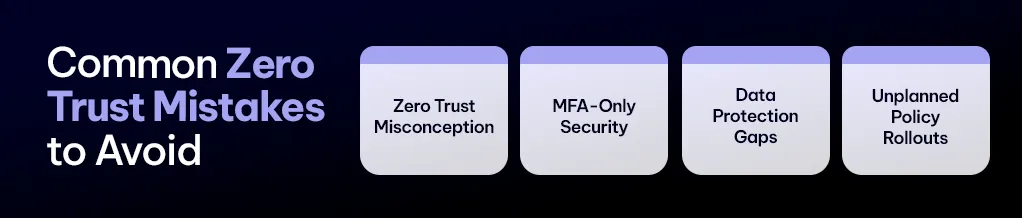
Many organisations understand the concept of Zero Trust but struggle with implementation.
Common mistakes include:
Treating Zero Trust as a Single Product
Zero Trust is a security strategy, not a product.
Implementing one security tool does not automatically create a Zero Trust environment.
Enabling MFA and Stopping There
MFA is important, but modern attackers increasingly target authentication sessions, tokens, and users themselves.
Organisations should combine MFA with Conditional Access and continuous monitoring.
Ignoring Data Security
Strong authentication does not prevent users from accidentally sharing sensitive information.
Data classification and protection should be part of the strategy.
Applying Policies Without Planning
Overly restrictive policies can disrupt employees and business operations.
Organisations should test policies carefully and implement them in stages.
A Practical Zero Trust Roadmap for Microsoft 365
Building Zero Trust does not need to happen overnight.
A phased approach can help organisations prioritise the highest risks.
Phase 1: Assess Your Current Environment
Review:
- Microsoft 365 configuration
- Identity security
- MFA coverage
- User permissions
- Device security
- Data protection
Identify the most significant gaps.
Phase 2: Strengthen Identity
Focus on:
- MFA
- Conditional Access
- Identity Protection
- Privileged access
Identity should be a priority because it is one of the most common attack targets.

Microsoft 365 Security for Healthcare Providers: Protecting Patient Data and Business Operations
Phase 3: Secure Devices and Applications
Ensure devices accessing business systems meet defined security requirements.
Review application access and third-party permissions.
Phase 4: Protect Sensitive Data
Classify sensitive information and implement appropriate data protection policies.
Review external sharing and data access permissions.
Phase 5: Continuously Monitor and Improve
Security environments constantly change.
Regularly review policies, investigate alerts, and adapt security controls as new threats emerge.
How Exigo Tech Helps
At Exigo Tech, we help organisations take a practical approach to Zero Trust security.
As your Managed Intelligence Partner, we help assess your current environment, identify security gaps, and build a roadmap that aligns with your business requirements.
Our capabilities include:
- Zero Trust Cybersecurity Assessments
- Microsoft 365 Security Health Checks
- Microsoft Entra ID and identity security
- Multi-Factor Authentication implementation
- Conditional Access configuration
- Microsoft Intune device management
- Microsoft Defender security solutions
- Microsoft Purview data protection
- Managed Security as a Service (MSaaS)
- Ongoing security monitoring and consulting
Our approach focuses on helping organisations improve security without unnecessarily increasing complexity.

Table of Contents
Tags
Related Articles

Microsoft 365 Security for Healthcare Providers: Protecting Patient Data and Business Operations

Endpoint Security for SMBs: Protecting Devices, Users and Business Data

Compliance and Cybersecurity Challenges Facing Australian Local Governments

Let's Talk About Your IT Challenges
Book a free consultation with our experts today. We'll analyze your current infrastructure and provide actionable recommendations.