
- Technologies
- Dynamics 365 Business Central Workshop
- Dynamics 365 Supply Chain Management Workshop
- Dynamics 365 Finance Readiness Assessment
- Dynamics 365
- Customer Data Platform
- Dynamics 365 Sales
- Dynamics 365 Service
- Dynamics 365 Marketing
- Dynamics 365 Supply Chain Management
- Dynamics 365 Business Central
- Dynamics 365 Finance
- Dynamics 365 Project Management
- Modern Application Development
- Dynamics 365 for Sales Workshop
- Innovation
- Contact us
A Quick Guide for Getting to Know Dynamics 365 Business Central

• Jan 13, 2022 • 10 min read

While dealing with standalone apps, it is easy to get muddled by the disconnected processes in business and dealing with the issue becomes a monumental task because that means interrupting business workflows. This is when Dynamics 365 Business Central comes in – it helps businesses stay up to date and deliver exceptional customer experiences. This platform also helps you to unify business solutions by offering Integrations for banking, custom application, payroll, and others to simplify business operations. Business Central covers all the bases that are required for a modern business by providing an intuitive surface and we have collected everything that you need to know about this ERP solution in this blog.
What is Dynamics Business Central?
Dynamics 365 Business Central gives today’s businesses all the tools and workflows that are required to connect functions across the enterprise and make data-driven decisions.
The Business Central platform also enables extensive custom configuration to enhance business operations.
What is Business Central?
Business Central is an ERP system that is part of Microsoft Dynamics 365, and it also has CRM capabilities.
What is Business Central NAV?
Microsoft rebranded its Dynamics Suite to rename the cloud-based version of the software to Business Central and the on-premise version to Dynamics NAV.
Is Microsoft 365 Business Central the same as Dynamics NAV?
Since both the versions – on-premise and cloud-based software are now titled Business Central and NAV name is officially retired.
What is there in Microsoft Dynamics 365 Business Central essential?
Business Central Essentials comes with several modules that are considered essential for any business and hence it has the name:
- Financial Management
- Warehouse Management
- Project Management
- Customer Relationship Management
- Human Resources Management
- Supply Chain Management
All these modules help keep a track of the budget, sales, employee and customer relationships, and much more.
Is the Dynamics 365 Business Central available in the cloud?
Business Central is an all-in-one business management application that functions as an efficient ERP solution. You can get all the functionality you need to run a business with Business Central and it can be deployed both on-premise and in the cloud.
What is there in Microsoft Dynamics 365 Business Central?
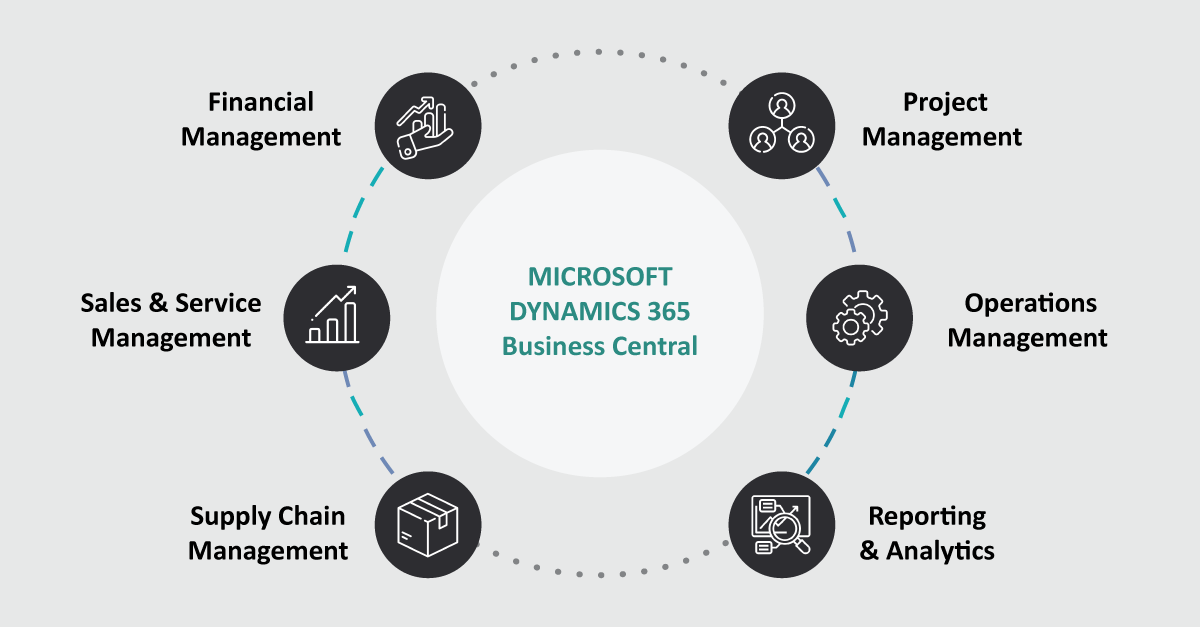
How can business central help any organization in digital transformation?
Dynamics 365 Business Central, being a cloud-based ERP system, streamlines the management of operations, financials, sales, supply chain, and reporting into a unified solution. It comes with its business intelligence along with automation and analytical solutions such as Power Bi and Power Apps. This allows you to customise the ERP to be a more powerful business tool. Another advantage of using such a cloud-based system is that it can be used anytime, anywhere and, on any device, ensuring real-time access to the information to prevent any challenges.
What is inventory management in Business Central?
Dynamics 365 Business Central comes well equipped with numerous tools including inventory management to give your company a better insight into your warehouse efficiency. It allows you to completely define the product management path and provides information about stock shortages, point of sale, invoice, and define restock and future stock items.
What are the advantages of Microsoft Dynamics 365 Business Central Solutions?
The Cloud version of Dynamics 365 Business Central has many benefits that can transform your business.
- Business Central provides a single source of data which means all the information is stored, secured, and constantly updated in real-time with the latest information. This also allows everyone to use and access the same data while making reports or taking decisions.
- This CRM feature also lets you gain insights into customer interactions, track details and easily respond to the issues, inquiries, and more.
- Dynamics 365 BC is also equipped with robust supply chain management and warehouse features that can automatically create purchase orders and streamline operations.
- Another key advantage of Business Central is its flexibility which lets you grow easily and expand your business needs.
- Project management features of BC help in managing resources by planning sales and getting real-time project insights and metrics to ensure profitability.
- Dynamics 365 Business Central easily integrates with other Microsoft apps and comes with inbuilt Power BI dashboards that can meet the unique needs of your business.
- Business Central also has features such as authentication, data encryption, and authorisation that can safeguard your application and ensure business compliance.
What is there in Microsoft Dynamics 365 Business Central essential?
As the word essential suggests Microsoft Dynamics 365 Essential comes with the basic set of tools that are essential to run and manage your business. But if you need anything more then you should look for the premium version of the product at a higher cost.
What are the advantages of Microsoft Dynamics 365 Business Central Solutions?
There are many reasons why Business Central is best for your organisation, a few of them are:
- Great Flexibility – As Business Central architecture is built on NAV, it is flexible on-premise, in the cloud, and in hybrid combination to fit into the needs of all businesses.
- Customer Relationship Management – Dynamics 365 BC comes with an integrated CRM that once activated will enhance the relationship of your business and customers.
- Microsoft Integrations – Business Central integrates easily with other Microsoft services such as Office 365, PowerApps, and Power BI.
- Business Intelligence – With integrated Power Bi, Business Central improves the decision-making process and provides real-time insights.
What are Dynamics 365 Business Central capabilities?
Microsoft Dynamics 365 Business Central comes with many capabilities, visit – this page to know more about the features of Business Central.
How do you empower your organization with Dynamics 365 Business Central?
With seamless integration of ERP and CRM, Business Central provides a comprehensive business management solution that empowers the organisation to embrace digital transformation. Business Central also provides real-time insights that bring in transparency and leads to increased productivity.
What features does Business Central provide to small businesses?
There are many features of Business Central which can be applied to the small business scenario:
- Dynamics 365 Business Central can be used by a number of employees and hence serves as a perfect tool for small businesses.
- With Dynamics 365 you can keep your finances aligned and updated as it lets you perform hundreds of transactions seamlessly.
- No matter your budget, Business Central is extremely easy to manage and deploy in a cloud or hybrid cloud environment.
- Dynamics 365 can easily integrate with other Microsoft products including the Office 365 suite.
How can Microsoft Dynamics 365 Business Central solutions benefit business organisations?
Business Central enables your organisation to consolidate number of unconnected system into a single system while also increasing the productivity through automated workflows and processes.
How has Microsoft Dynamics 365 Business Central changed the ERP world?
Business Central gives companies the flexibility to add functionality and supports customisation that is easy to configure. A cloud-based ERP like Business Central not only keeps the business data secure but is also highly adaptable and can be scaled for business expansion. It enables business management that includes sales, finance, manufacturing, project management, human resources, supply chain management, and others.
Why do we need to upgrade from Dynamic NAV to Dynamic 365 Business Central?
One of the biggest worries that businesses usually have about upgrading NAV is the data structures. But with Business Central all information remains the same as in NAV as long as your information is well organised and not corrupted.
Now you may ask
Why should you move to Business Central?
or
Why do we need to upgrade from Dynamic NAV to Dynamic 365 Business Central?
And
Why is migration to Microsoft Dynamics D365 Business Central essential?
To answer this, there are several reasons why you should migrate to Business Central: – Dynamics 365 Business Central builds on the functionality that NAV had with modern features like focus mode, late payment search, fuzzy search and more
– Business can also embrace the benefits of artificial intelligence and machine learning to become more efficient and reduce manual processes.
To know about the misconceptions to consider while migrating from Dynamics GP to Business Central read this blog.
How to install Dynamics 365 Business Central?
Both Business Central on-premise and Business Central online involve certain processes for installation. Let’s further understand the steps involved in implementing Business Central into your business system.
What are the steps involved in a D365 Business Central Implementation Process?
If your business is ready to move forward with Dynamics 365 implementation, then it would involve the following steps:
- Business Process Review: This process involves planning and preparing the roadmap for successful implementation of Business Central.
- Training Users: The 2nd step in the process is to train end-users with the application so that it ensures that the users have a clear understanding of the application.
- Loading data: Creating a plan for data that is to be migrated and building configuration packages to leverage insights.
- Power BI: This step involves building up the Power BI dashboards and measuring the success of your business.
- Going Live: The final process is to make the Business Central tool live and get an ERP system that is scalable with your business.
What’s new in Business Central?
The latest release wave by Microsoft for Dynamics 365 Business Central focuses on a set of features that are incorporated to improve the way admins manage the permissions and licenses. The other areas of improvement include banking, payments, Outlook and Excel add-ins, and continued improvements in performance.
What is Dynamics 365 Business Central for iws?
IWs stands for Information Worker that represents those users that are designated to one of the 10,000 licenses that are provided for the trial of Business Central.
How to connect Power BI to Business Central?
You can connect Power BI as a data source in the Power BI desktop to connect it with your Business Central data and start creating reports. For this, you can follow the steps below:
Open Power BI Desktop and select Get data. In the get data page select online services and select Dynamics 365 Business Central and hit connect.
Now you can connect to your Business Central and load the data that you want to add to your data model. Once this is completed you can start building a Power BI report.
What is the latest innovation under Microsoft Dynamics 365 Business Central?
Business Central provides connected cloud business management solutions for all organisations. It brings together your sales, service, finance, and operations within a single application. In the latest innovation, Microsoft focuses on helping businesses to:
- Adapt faster during disruptions and pivot quickly to cultivate strategic plans.
- Work smarter and boost productivity using interoperability.
- Perform better with continuous improvements, responsiveness, and real-time insights across your business.
What is the Business Central API endpoints?
Both Business Central’s online and on-premise version makes it possible to integrate with other services using APIs and to enable them one must have access to the API. Upon receiving access to these API endpoints, you can write codes to integrate your service with Business central.
Want to know how do Microsoft Dynamics 365 Business Central solutions work? Connect with our expert
When looking for an enterprise resource planning system you need to look beyond the basic features and investing in an end-to-end cloud-based business solution such as Dynamics 365 Business Central offers you many advantages. Contact us on 1300 EXIGOTECH (394 468) or email sales@exigotech.com.au to learn more about how Business Central can help your organisation.
Table of Contents
- What is Dynamics Business Central?
- Is the Dynamics 365 Business Central available in the cloud?
- What is there in Microsoft Dynamics 365 Business Central?
- What are the advantages of Microsoft Dynamics 365 Business Central Solutions?
- What is there in Microsoft Dynamics 365 Business Central essential?
- What are the advantages of Microsoft Dynamics 365 Business Central Solutions?
- How has Microsoft Dynamics 365 Business Central changed the ERP world?
- Why do we need to upgrade from Dynamic NAV to Dynamic 365 Business Central?
- How to install Dynamics 365 Business Central?
- What’s new in Business Central?
- What is the latest innovation under Microsoft Dynamics 365 Business Central?
- What is the Business Central API endpoints?
- Want to know how do Microsoft Dynamics 365 Business Central solutions work? Connect with our expert
Tags




Let's Talk About Your IT Challenges
Book a free consultation with our experts today. We'll analyze your current infrastructure and provide actionable recommendations.