- Technologies
- Dynamics 365 Business Central Workshop
- Dynamics 365 Supply Chain Management Workshop
- Dynamics 365 Finance Readiness Assessment
- Dynamics 365
- Customer Data Platform
- Dynamics 365 Sales
- Dynamics 365 Service
- Dynamics 365 Marketing
- Dynamics 365 Supply Chain Management
- Dynamics 365 Business Central
- Dynamics 365 Finance
- Dynamics 365 Project Management
- Modern Application Development
- Dynamics 365 for Sales Workshop
- Innovation
- Contact us
How can Microsoft 365 Intune help Solve Common Business Problems?

• May 12, 2022 • 6 min read

Managing the security of remote workforces is one of the challenges organisations face post-pandemic. In addition to deciding which cloud platforms to use, they need to think about how secure their employees’ devices are. Organisations face many challenges when dealing with endpoints that are located outside of the office premises including:
- Secure management of cloud assets
- Proper updating of devices
- Managing data for lost or stolen devices
- Keep track of the devices accessing your cloud applications.
Remote working is expected to explode more in 2023 as many organisations are adopting the hybrid working models and moving towards accommodating permanent work from home for their employees. This means that device security, especially for remote teams, is a high priority for businesses right now. One such application which comes with Microsoft 365 Business Premium subscription or as a stand-alone package is Microsoft 365 Intune.
But before we dive deep into what business problems can Intune help with, let us have an insight into Microsoft 365 Intune, how it works in conjunction with other M365 management, what are its features, security aspects, license requirements, and how Exigo Tech helps in providing Microsoft Intune Portal and other device management applications.
What is Microsoft 365 Intune?
Microsoft 365 Intune is a Cloud-based Enterprise Mobility Management (EMM) and Enterprise Device Management (EDM) product that helps businesses manage the mobile device and apps that employees use to access corporate data.
How does Microsoft 365 Intune work?
Being an essential part of Microsoft Enterprise Mobility + Security (EM + S), Microsoft 365 Intune helps you manage your device environment. By providing both application and device management, Microsoft 365 Intune helps users acquire secure access to their data so that they can stay productive by keeping business data protected at all times.
This might leave you with another question,
Is Intune part of Microsoft 365?
Microsoft 365 Intune is a standalone product that is included as a part of a few Microsoft 365 plans. It comes with Microsoft 365 plans such as Premium where you get access to several advanced security features designed to protect company data.
Ok then,
How do you license Microsoft 365 Intune?
Intune can be licensed per user in several different ways based on your needs and the size of your organisation:
- Intune Standalone License
- Enterprise Mobility and Security (EM + S) plan includes Intune
- Microsoft Business Premium (M365 and not O365 plans) includes Intune
What is the Microsoft Intune Company portal?
Through the Company Portal, you can install applications on your updated Windows computers managed by your organisation. Applications, web links, and other configurations can be published by your IT (Information Technology) team and made available on the Company Portal.
What are the benefits of Microsoft Intune?
Microsoft 365 Intune comes with plenty of features that are quite simple to understand and make use of.
- Device Management: The scope of device management, MDM (Mobile Device Management) that Intune features is huge. You can keep track of all your employee’s devices whether it is company-owned or personal devices.
- Application Management: Mobile Application Management (MAM) lets you protect your organisation’s data at application levels as opposed to device-level including both custom and store apps.
- Conditional Access: Intune integrated with Azure AD (Active Directory) enables a range of access control to ensure compliance with your organisation’s standards.
As shown below, Microsoft Intune acts as a central hub for full deployment, management, and control of all your company devices.
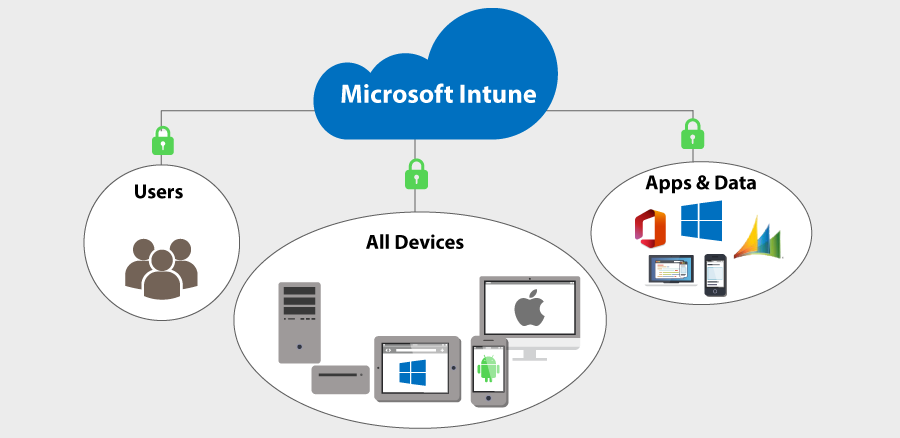
Intune not only allows managing and protecting data but also goes a step further in deploying security policies that can be enforced even if the devices are not registered.
Here are a few business problems that Intune can help you with to secure both endpoint devices and office data:
-
Secure access to email and data from organisation’s on-premise system
If you have an on-premise server that your employees need to securely access, then Intune managed certificates combined with a VPN (Virtual Private Network) gateway can enable such access. Once your employees’ devices are enrolled in Intune, the management system will ensure that the devices are compliant with security policies before they can access any data.
-
Secure access to email and data using Office 365
With Intune’s Enterprise Mobility + Security, your organisation can take advantage of the conditional access solution ensuring that none of your employees can access data without adhering to compliance.
For example, if you have a condition in place that multi-factor authentication (MFA) is required to access your corporate data, then Intune EMS will not allow any user to do so until the MFA criteria have been met.
-
Organisation owned devices for the workforce
To ensure that your corporate data is secure, Intune offers bulk provisioning and management solutions that are integrated with device management platforms. Such devices are configured with your security policies and the Intune Company Portal app helps them access the resources that are made available.
-
Bring your device (BYOD) for your employees
Many employees do not want to carry a second device for office work, so BYOD (Bring your own device) is gaining popularity amongst such an audience. Microsoft 365 Intune caters to this need where you can manage and protect the corporate data from the apps that pull-out data from both personal and official sources.
-
Limit the use of shared devices for employees
For employees requiring a second device in the form of tablets to check processes, sales, or check inventory, installing Intune comes in handy. You can manage and secure such iOS and Android tablets with limit use mode amongst your employees.
-
Limit employee access to devices you control
Has your employee ever used a public computer to sign into their corporate email?
Well, then with Intune you can limit access to your corporate data to only those devices that your organisation manages. Along with such device-based conditions, app-based conditional access is also possible with Intune.
So,
How can Intune add value to your business?
Microsoft 365 Intune allows you to manage your employee’s devices protecting your data and ensuring maximum security measures.
This gives both you and your employees the freedom to do more. Knowing that your data is protected wherever your employees are located, allows for more efficient remote working. Employees also have all the access to the resources and tools they need to do their job even when they are not in the office.
Want to set up Microsoft 365 Intune to secure your remote workforce needs?
Microsoft 365 Intune protects your organisation and helps you control how your employees access and share critical business information. That is important considering today’s remote workforce. Even if you think you are on top of your cybersecurity strategy, there can be gaps. Microsoft Intune Company app can give you peace of mind that your information is secure, however, and whenever your team works.
If you would like to discuss how to manage your devices and applications and secure them using Microsoft 365 Intune, contact us for a free consultation.
Table of Contents
- What is Microsoft 365 Intune?
- How does Microsoft 365 Intune work?
- Is Intune part of Microsoft 365?
- How do you license Microsoft 365 Intune?
- What is the Microsoft Intune Company portal?
- What are the benefits of Microsoft Intune?
- How can Intune add value to your business?
- Want to set up Microsoft 365 Intune to secure your remote workforce needs?
Tags




Let's Talk About Your IT Challenges
Book a free consultation with our experts today. We'll analyze your current infrastructure and provide actionable recommendations.