- Technologies
- Dynamics 365 Business Central Workshop
- Dynamics 365 Supply Chain Management Workshop
- Dynamics 365 Finance Readiness Assessment
- Dynamics 365
- Customer Data Platform
- Dynamics 365 Sales
- Dynamics 365 Service
- Dynamics 365 Marketing
- Dynamics 365 Supply Chain Management
- Dynamics 365 Business Central
- Dynamics 365 Finance
- Dynamics 365 Project Management
- Modern Application Development
- Dynamics 365 for Sales Workshop
- Innovation
- Contact us
IT Support SLA Best Practices: How to Build Effective Service Level Agreements
 Niten Devalia
Chief Sales Officer / Co-founder • Sep 14, 2026 • 5 min read
Did you know?
For businesses that depend on cloud applications, connectivity, cybersecurity, and digital systems every day, the quality and responsiveness of IT support can directly affect productivity and business continuity.
This is where a well-designed IT Support Service Level Agreement (SLA) becomes important.
An SLA establishes clear expectations between a business and its IT service provider. It defines how quickly issues should be acknowledged, prioritised, resolved, escalated, and communicated.
However, not every SLA delivers the same value. A document filled with technical response times may look comprehensive but still fail to address what matters most to the business.
At Exigo Tech, we help organisations build reliable IT operations as their Managed Intelligence Partner, combining responsive support, proactive management, security, and continuous optimisation.
How to Secure Microsoft Copilot Agents with Microsoft 365 E5
What Is an IT Support SLA?
An IT Support SLA is a formal agreement that defines the level of service a business can expect from its IT provider.
A good SLA establishes expectations around:
- Support availability
- Response times
- Resolution targets
- Issue priorities
- Escalation procedures
- Communication
- Service reporting
- Customer and provider responsibilities
The objective is not simply to promise fast support. It is to create a measurable framework that aligns IT services with business priorities.
Why IT Support SLAs Matter

Without clearly defined service expectations, businesses may struggle to understand whether their IT provider is delivering an acceptable level of service.
An effective SLA provides:
-
Accountability
Both parties understand their responsibilities and commitments.
-
Predictability
Employees and managers know what happens when an IT issue is reported.
-
Transparency
Service performance can be measured against agreed targets.
-
Business Alignment
Critical systems can receive greater priority than minor technical issues.
A strong SLA therefore becomes a management tool, not just a support document.
1. Define Clear Priority Levels
Not every IT issue has the same business impact.
A server outage affecting an entire organisation should not be handled in the same way as a single user’s printer problem.
A practical SLA should define priority levels based on business impact and urgency.
For example:
- Critical: Major business system unavailable or widespread outage.
- High: Significant disruption affecting multiple users or an important business function.
- Medium: Limited operational impact with an available workaround.
- Low: Minor issue, request, or non-urgent support requirement.
Clear definitions prevent confusion and help support teams allocate resources appropriately.

Agentic AI for Operations Leaders: Turning AI into Action
2. Separate Response and Resolution Times
One common SLA mistake is treating response time and resolution time as the same thing.
Response time refers to how quickly the support team acknowledges and begins addressing an issue.
Resolution time refers to how long it takes to restore the service or resolve the underlying problem.
Resolution times can be difficult to guarantee because some incidents require third-party vendors, complex troubleshooting, or infrastructure changes.
A good SLA should clearly distinguish between these two measurements.
3. Set Business-Focused Targets
SLA targets should reflect the needs of the organisation.
For example, a business operating critical applications outside standard office hours may require 24/7 support.
Another organisation may only require extended support during specific operational periods.
Consider:
- Business operating hours
- Critical applications
- Number of users
- Industry requirements
- Remote workforce
- Cybersecurity risks
- Business continuity requirements
The SLA should be designed around how the business operates, not based only on a provider’s standard package.

4. Define Support Availability
Businesses should know exactly when support is available.
An SLA should clearly document whether support includes:
- Standard business hours
- Extended hours
- Weekends
- Public holidays
- 24/7 critical incident support
For businesses that rely heavily on cloud services and remote operations, after-hours support may be particularly important.
5. Establish Escalation Procedures
Some incidents cannot be resolved by the first level of support.
A strong SLA should define how issues are escalated when:
- Resolution targets are at risk
- Specialist expertise is required
- A third-party vendor is involved
- A critical system remains unavailable
Escalation paths should be transparent so customers know who is responsible for progressing an unresolved issue.

Microsoft 365 Security for Healthcare Providers: Protecting Patient Data and Business Operations
6. Include Communication Expectations
Fast technical response is valuable, but communication is equally important during major incidents.
An SLA should establish expectations around:
- Incident notifications
- Progress updates
- Escalation communication
- Expected update frequency
- Closure notifications
For critical incidents, regular communication helps business leaders understand the situation and make informed operational decisions.
7. Define Service Reporting and KPIs
An SLA should make service performance measurable.
Useful metrics can include:
- First response time
- Average resolution time
- SLA compliance
- Number of incidents
- Recurring incidents
- Service availability
- Customer satisfaction
- Open ticket ageing
Regular reporting helps organisations identify trends rather than simply reviewing individual tickets.
Common IT Support SLA Mistakes
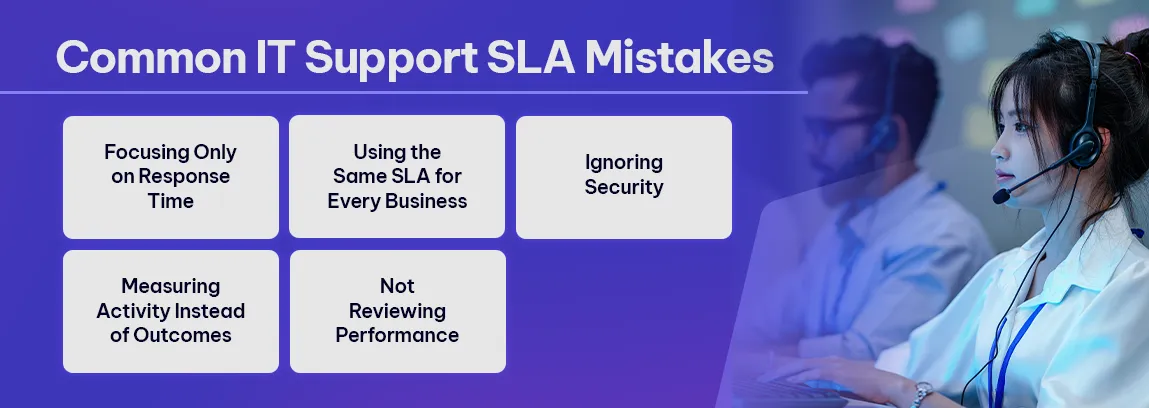
Businesses should avoid several common mistakes when developing an SLA.
-
Focusing Only on Response Time
A fast acknowledgement does not necessarily mean an issue will be resolved effectively.
-
Using the Same SLA for Every Business
Different organisations have different operational requirements.
-
Ignoring Security
Cybersecurity incidents require different escalation and response procedures from routine IT issues.
-
Measuring Activity Instead of Outcomes
The number of tickets closed does not necessarily indicate service quality. Business impact and user experience matter more.
-
Not Reviewing Performance
An SLA has limited value if nobody regularly measures performance against it.
Why Choose Exigo Tech as Your Managed Intelligence Partner
At Exigo Tech, we take a proactive approach to IT service management, combining responsive support with continuous monitoring, security, and optimisation.
As your Managed Intelligence Partner, our managed IT services can include:
- Service Desk and IT Support
- Proactive Infrastructure Monitoring
- Cloud and Microsoft 365 Management
- Cybersecurity Services
- Patch and Device Management
- Backup and Business Continuity
- IT Health Checks
- Service Reporting and SLA Management
- Strategic IT Consulting
Our focus goes beyond closing support tickets. We continuously look for ways to improve reliability, security, performance, and business value.
Table of Contents
Tags
Related Articles
How Managed Application Services Improve Uptime and Reliability
Benefits of Managed IT Services for SMBs: A Practical Guide

Managed Application Services: When to Outsource Power Platform & Dynamics Support

Let's Talk About Your IT Challenges
Book a free consultation with our experts today. We'll analyze your current infrastructure and provide actionable recommendations.