- Technologies
- Dynamics 365 Business Central Workshop
- Dynamics 365 Supply Chain Management Workshop
- Dynamics 365 Finance Readiness Assessment
- Dynamics 365
- Customer Data Platform
- Dynamics 365 Sales
- Dynamics 365 Service
- Dynamics 365 Marketing
- Dynamics 365 Supply Chain Management
- Dynamics 365 Business Central
- Dynamics 365 Finance
- Dynamics 365 Project Management
- Modern Application Development
- Dynamics 365 for Sales Workshop
- Innovation
- Contact us
Dynamics 365 Migration Checklist: A Step-by-Step Guide for a Successful Transition
 Alpesh Prajapati
Operational Excellence Manager • Sep 23, 2026 • 5 min read
Moving from a legacy ERP or CRM platform to Dynamics 365 can change how finance, sales, operations, customer service, supply chain, and other teams work every day.
A successful migration therefore requires more than moving data from one system to another. Businesses need to understand their existing environment, define what should move, redesign processes where necessary, validate integrations, prepare users, and carefully plan the transition to the new platform.
Microsoft recommends treating data migration, testing, cutover, change management, and operational readiness as core parts of Dynamics 365 implementation and go-live planning.
Whether you’re moving from an on-premises ERP, a legacy CRM, another business application, or a collection of disconnected systems, this checklist can help you plan the migration with fewer surprises.

How to Secure Microsoft Copilot Agents with Microsoft 365 E5
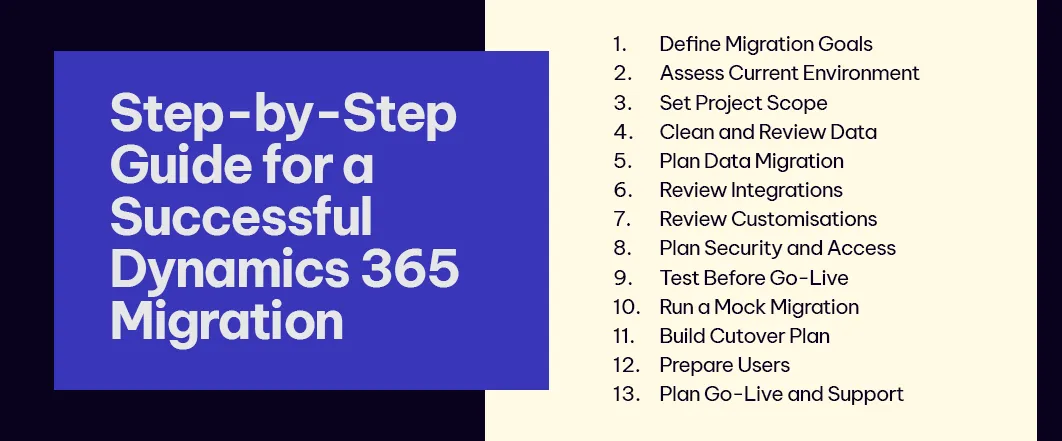
1. Define Your Migration Objectives
Start by establishing why you’re migrating.
Your objectives might include:
- Replacing an ageing ERP or CRM
- Moving from on-premises infrastructure to the cloud
- Improving financial visibility
- Automating manual processes
- Connecting business applications
- Improving customer experience
- Supporting business growth
- Reducing technology complexity
These objectives should guide decisions throughout the project.
Avoid treating migration as simply a system replacement. Use the opportunity to identify where processes can be simplified, automated, or redesigned.
2. Assess Your Existing Environment
Before deciding what to migrate, understand what you currently have.
Document:
- Applications
- Databases
- Customisations
- Integrations
- Reports
- Workflows
- User roles
- Business processes
- Data volumes
- Third-party applications
This assessment helps identify dependencies that could otherwise create problems during migration.
3. Assess Your Existing Environment
Dynamics 365 covers multiple business applications, so clearly define what your project includes.
Depending on your requirements, this could involve:
- Dynamics 365 Business Central
- Dynamics 365 Finance
- Dynamics 365 Supply Chain Management
- Dynamics 365 Sales
- Dynamics 365 Customer Service
- Dynamics 365 Customer Insights
- Power Platform
Define which business processes are moving, which systems will remain, and which capabilities will be replaced.
A clear scope also helps prevent unnecessary customisation.

Agentic AI for Operations Leaders: Turning AI into Action
4. Review and Clean Your Data
Do not migrate everything simply because you can.
Legacy systems often contain years of:
- Duplicate records
- Inactive customers
- Outdated products
- Inconsistent addresses
- Obsolete transactions
- Incomplete records
Before migration, classify your data into categories such as:
Migrate: Data required for ongoing business operations.
Archive: Historical information that must be retained but does not need to be active.
Remove: Duplicate, obsolete, or unnecessary information.
5. Create a Data Migration Strategy
A formal migration strategy should define:
- Source systems
- Target Dynamics 365 environment
- Data entities
- Data volumes
- Mapping requirements
- Transformation rules
- Migration tools
- Migration sequence
- Ownership
- Validation requirements
- Cutover activities
A well-defined strategy reduces the risk of discovering critical migration issues just before go-live.
6. Review Integrations
Your Dynamics 365 environment may need to connect with:
- Payroll
- Banking platforms
- CRM systems
- E-commerce platforms
- Warehouse systems
- Payment providers
- Reporting platforms
- Third-party applications
Document each integration and determine whether it should be:
Retained: Existing integration continues.
Rebuilt: Integration is redesigned for Dynamics 365.
Replaced: A new integration or native capability is used.
Retired: The integration is no longer required.
7. Review Customisations and Extensions
Legacy systems often contain years of custom development.
Before migrating these customisations, ask:
- Is the functionality still required?
- Can Dynamics 365 provide it natively?
- Can Power Platform provide a better solution?
- Is the customisation creating unnecessary complexity?
- Does it still support the current business process?
Migration provides an opportunity to move towards a more standardised environment rather than recreating every legacy workaround.
8. Plan Security and User Access
Define who should have access to what before users are moved into the new system.
Review:
- User roles
- Permissions
- Segregation of duties
- Administrative access
- Sensitive financial information
- Customer data
- Approval workflows

Microsoft 365 Security for Healthcare Providers: Protecting Patient Data and Business Operations
9. Test Before You Go Live
Testing should happen throughout the migration, not only at the end.
Key testing stages can include:
- Unit testing
- Functional testing
- Integration testing
- Data migration testing
- Performance testing
- Security testing
- User Acceptance Testing
- Regression testing
10. Run a Mock Migration
A test migration gives your team the opportunity to identify problems before the real cutover.
Run the migration using realistic data and measure:
- Migration duration
- Data accuracy
- Data completeness
- Transformation errors
- Duplicate records
- Integration behaviour
- Reporting results
11. Build Your Cutover Plan
Your cutover plan should specify exactly what happens before, during, and after go-live.
Include:
- Task sequence
- Owners
- Backup owners
- Timing
- Dependencies
- Validation steps
- Communication activities
- Go/no-go criteria
- Rollback plan
A detailed cutover plan reduces uncertainty when the business transitions from the old platform to Dynamics 365.
12. Prepare Your Users
Technology implementation succeeds when people are ready to use it.
Prepare users through:
- Role-based training
- Process documentation
- Demonstrations
- User guides
- Communication
- Support channels
- Super-user programmes
Training should focus on how work will change, not simply where users need to click.
This is particularly important when Dynamics 365 introduces new workflows, automation, dashboards, or approval processes.
13. Prepare for Go-Live and Beyond
Go-live is not the end of the migration.
Your post-go-live plan should cover:
- User support
- System monitoring
- Issue management
- Performance monitoring
- Data validation
- Reporting verification
- Integration monitoring
- Continuous optimisation
A structured post-go-live period helps teams resolve issues quickly while users adapt to the new platform.
Why Choose Exigo Tech as Your Managed Intelligence Partner
At Exigo Tech, we help organisations plan and execute Dynamics 365 migrations with a focus on business continuity, data integrity, user adoption, and long-term value.
Our Dynamics 365 capabilities include:
- Dynamics 365 migration consulting
- Business Central implementation
- Dynamics 365 Finance and Supply Chain
- Dynamics 365 Sales
- Data migration and integration
- Power Platform solutions
- Business process optimisation
- User training and change management
- Post-go-live support and optimisation
Our approach goes beyond moving data from one platform to another. We help businesses assess existing processes, identify opportunities for improvement, and build a modern business application environment aligned with their future goals.

Table of Contents
- 1. Define Your Migration Objectives
- 2. Assess Your Existing Environment
- 3. Assess Your Existing Environment
- 4. Review and Clean Your Data
- 5. Create a Data Migration Strategy
- 6. Review Integrations
- 7. Review Customisations and Extensions
- 8. Plan Security and User Access
- 9. Test Before You Go Live
- 10. Run a Mock Migration
- 11. Build Your Cutover Plan
- 12. Prepare Your Users
- 13. Prepare for Go-Live and Beyond
- Why Choose Exigo Tech as Your Managed Intelligence Partner
Tags
Related Articles
Managed Power Platform and Dynamics 365 Support Services: Keeping Business Applications Reliable
Cloud Managed Application Services: Why Ongoing Application Management Matters

Privacy in Practice: A Practical Guide to the Australian Privacy Principles (APPs)

Let's Talk About Your IT Challenges
Book a free consultation with our experts today. We'll analyze your current infrastructure and provide actionable recommendations.